


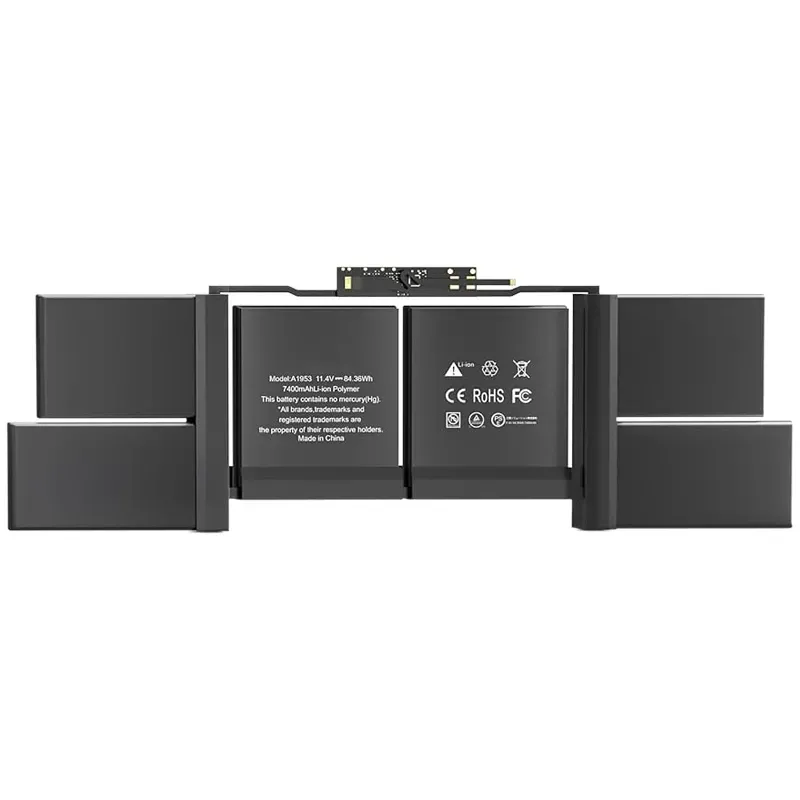


A1953 Replacement Battery for Apple mid 2018 2019 MacBook Pro 15 inch A1990 EMC 3215 EMC 3359 BTO/CTO MacBook Pro 15" Battery 83.6 Wh
 Security policies
 Shipping policies
 Return policies
Do you need a replacement battery for your MacBook Pro Retina 15 A1953 or A1990? We have the perfect solution for you!
The battery we offer is compatible with the MacBook Pro Retina 15 A1953 and A1990 models, ensuring excellent performance and reliability.
Made with high-quality materials, this replacement battery ensures a long lifespan and optimal operation of your MacBook Pro.
Thanks to its easy installation, you can replace the battery of your MacBook Pro in a few simple steps, saving time and money.
Don't miss the opportunity to purchase the replacement battery for MacBook Pro Retina 15 on iPhoneHospital.iT and repair your device effectively and affordably.
Battery Specifications:
Capacity: 83.6 Wh/7336 mAh ◆ Voltage: 11.4 V ◆ Battery Type: Lithium-ion ◆ Condition: 100% new ◆ Cells: Grade A cells
Warranty: 2 years (24 months warranty)
Battery Replacement Code: A1953
Compatible with the following models:
For MacBook Pro 15" A1990 (mid 2018)
For 15-inch MacBook, Intel Core i9 2.9 GHz, mid 2018
For MacBook Pro 15" A1990 EMC 3215 BTO/CTO
For 15-inch MacBook, Intel Core i7 2.6 GHz, mid 2018
For MacBook Pro 15" A1990 EMC 3215 MR942LL/A
For MacBook Pro 15" A1990 EMC 3215 MR972LL/A
For 15-inch MacBook, Intel Core i7 2.2 GHz, mid 2018
For MacBook Pro 15" A1990 EMC 3215 MR932LL/A
For MacBook Pro 15" A1990 EMC 3215 MR962LL/A
For MacBook Pro 15" A1990 (mid 2019)
For MacBook Pro 15" A1990 EMC 3359 Touch Bar
For MacBookPro15.1 (A1990), MacBookPro15.3 (A1990) / mid 2019
MV902LL/A or MV912LL/A or MV922LL/A or MV932LL/A or MV942LL/A or MV952LL/A
Why choose us?
☛ Very easy to install.
☛ Offers longer lifespan.
☛ Grade A++ cells with good performance.
☛ Multiple protections prevent damage to the device.
☛ Professional technical team, quick response within 24 hours.
☛ In case of quality issues, get a new replacement within 2 years.
☛ Professional technical teams, manufacturing facilities, and various types of batteries available.
Frequently Asked Questions
What should I do when using the battery for the first time?
Turn off the laptop and unplug the power when installing the new battery, fully charge the battery before first use. Then, discharge the new battery to 5%/7% (not 0%), then charge it to 95% and repeat the cycle 3-4 times.
Why can't my laptop recognize the battery?
Dear customer, if it is not recognized when you turn on the computer, try updating the BIOS settings or disconnect the old battery, press the power button for 20 seconds, then connect the new battery, or contact your service for assistance.
Something to pay attention to:
To extend the battery life, charge and discharge the battery at least once a month.
Do not expose the battery to hot and humid air.
Feel free to contact us if you have any doubts or if you are looking for another type of battery.
Data sheet
Specific References
